


Data table for figure 3
Post-use survey responses to 'Which of the following best describes your sentiment about Copilot after having used it?', by APS classification.
| Sentiment | Very pessimistic | Slightly pessimistic | Neutral | Slightly optimistic | Very optimistic |
|---|---|---|---|---|---|
| APS 3-6 (n=305) | 1% | 6% | 20% | 42% | 31% |
| EL1 (n=268) | 1% | 9% | 10% | 44% | 35% |
| EL2 (n=155)* | 1% | 6% | 14% | 45% | 35% |
| SES (n=43)* | 2% | 2% | 2% | 58% | 35% |
*Margin of error at a 95% confidence level > 0.05. Totals may amount to less or more than 100% due to rounding.
Off
Data table for figure 4
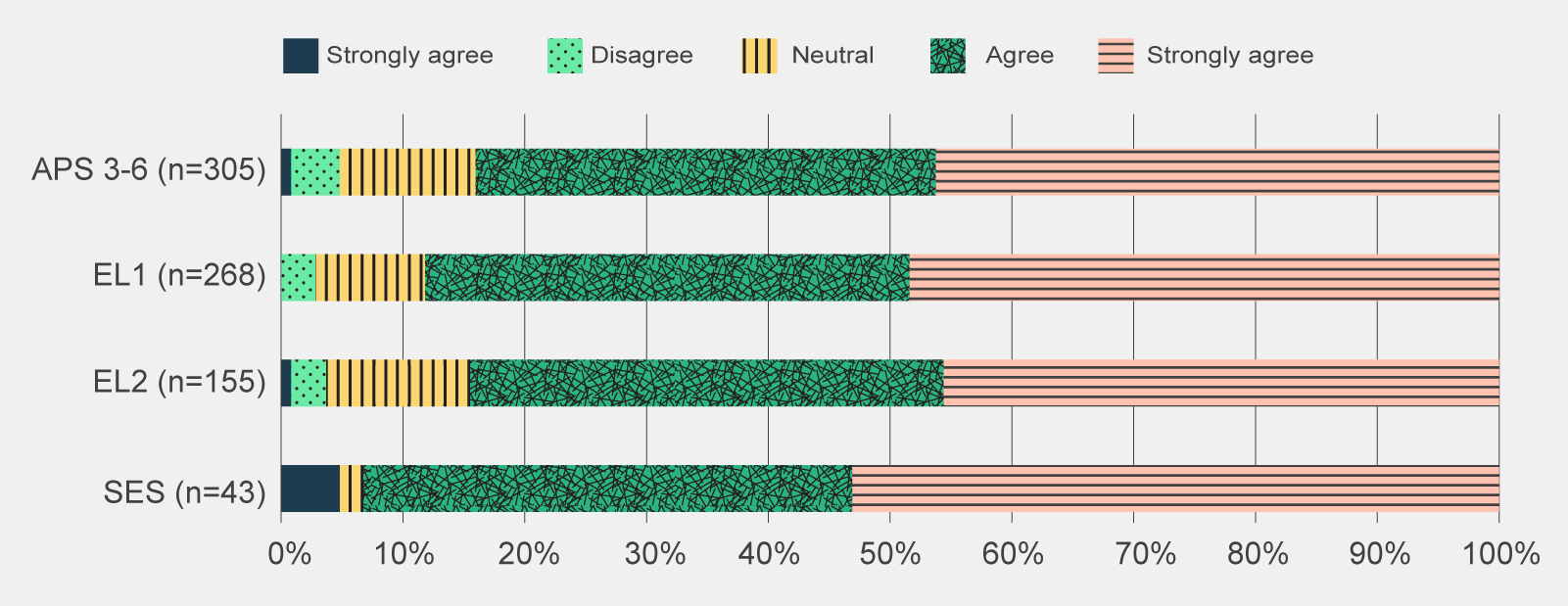
Post-use survey responses to 'Which of the following best describes your sentiment about Copilot after having used it?', by APS classification.
| Sentiment | Strongly disagree | Disagree | Neutral | Agree | Strongly agree |
|---|---|---|---|---|---|
| APS 3-6 (n=305) | 1% | 4% | 11% | 38% | 46% |
| EL1 (n=268) | 0% | 3% | 9% | 40% | 48% |
| EL2 (n=155)* | 1% | 3% | 12% | 39% | 46% |
| SES (n=43)* | 5% | 0% | 2% | 40% | 53% |
*Margin of error at a 95% confidence level > 0.05. Totals may amount to less or more than 100% due to rounding.
OffSES survey respondents in the post-use survey mainly referenced productivity benefits, both for themselves and their team. SES noted that Copilot appeared to be driving a reduction in time staff spent in creating briefing materials and lifted the general professionalism of written documents. On an individual level, it was seen as a tool for saving time through summarising meetings, email conversations and documents. SES survey respondents also viewed the trial as a positive step for the APS in embracing new technology.
Of the job families, trial participants in the Corporate grouping were particularly positive about Copilot with 86% of post-use survey respondents indicating they would like to continue to use Copilot after the trial as indicated in Figure 6.
Data table for figure 5
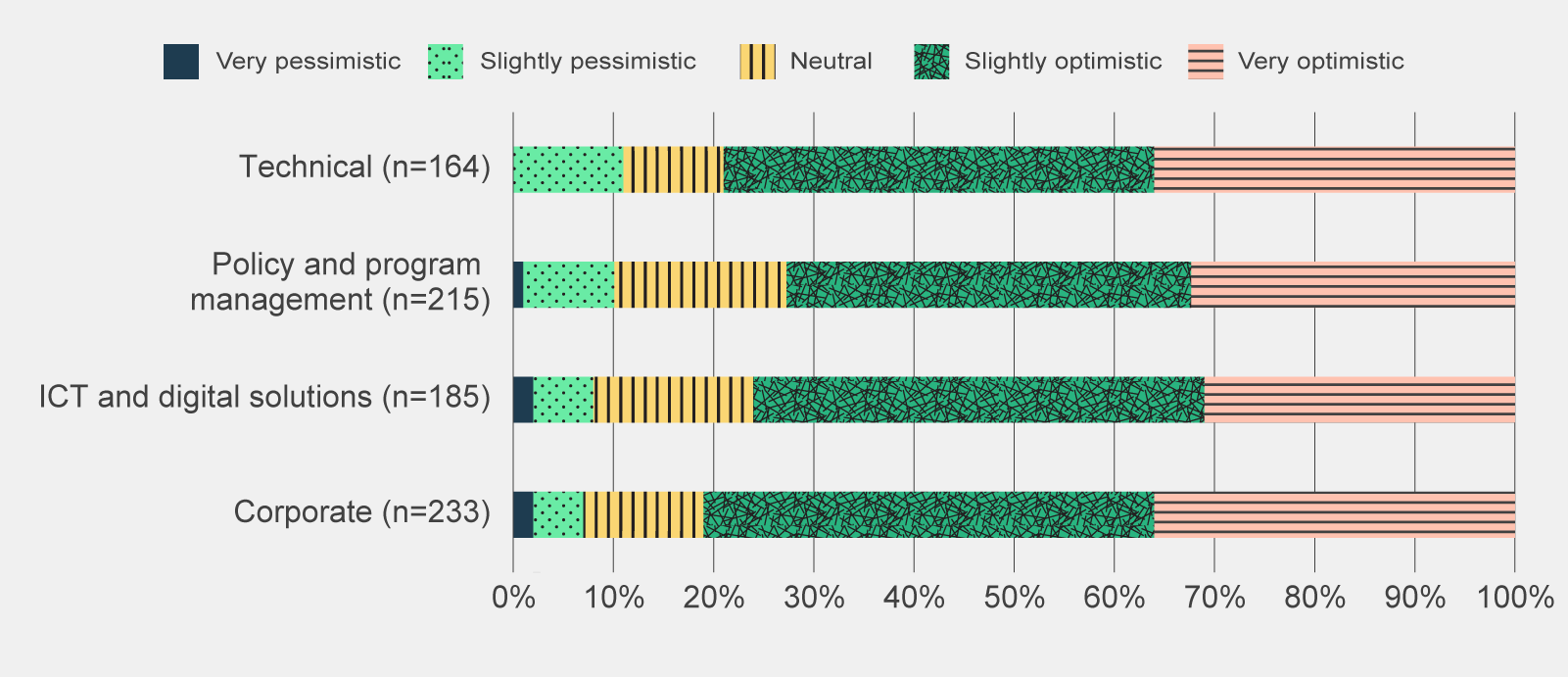
Post-use survey responses to 'Which of the following best describes your sentiment about Copilot after having used it?', by APS job family.
| Sentiment | Very pessimistic | Slightly pessimistic | Neutral | Slightly optimistic | Very optimistic |
|---|---|---|---|---|---|
| Technical (n=164) | 0% | 11% | 10% | 43%* | 36%* |
| Policy and program management (n=215) | 1% | 9% | 17% | 40%* | 32%* |
| ICT and digital solutions (n=185) | 2% | 6% | 16% | 45%* | 31%* |
| Corporate (n=233) | 2% | 5% | 12% | 45% | 36% |
*Margin of error at a 95% confidence level > 0.05 for combined ‘slightly’ and ‘very optimistic’. Totals may amount to less or more than 100% due to rounding.
Off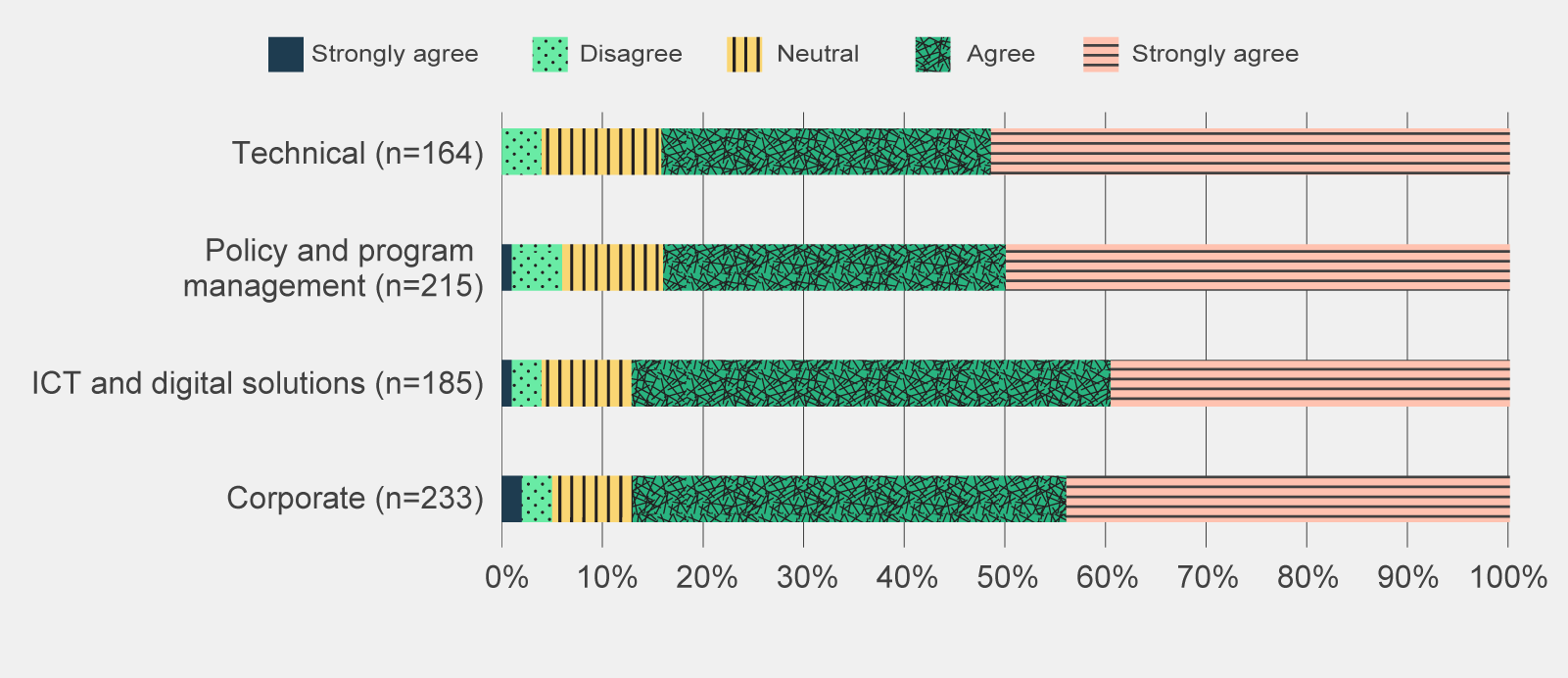
Data table for figure 6
Post-use survey responses to 'What extent do you agree with the following statement: I want to continue to use Copilot after the trial', by APS job family.
| Sentiment | Strongly disagree | Disagree | Neutral | Agree | Strongly agree |
|---|---|---|---|---|---|
| Technical (n=164) | 0% | 4% | 12% | 33% | 52% |
| Policy and program management (n=215) | 1% | 5% | 10% | 34% | 50% |
| ICT and digital solutions (n=185) | 1% | 3% | 9% | 48% | 40% |
| Corporate (n=233) | 2% | 3% | 8% | 43% | 44% |
Totals may amount to less or more than 100% due to rounding.
Off
Data table for figure 7
Pulse survey responses to 'How little or how much do you agree with the following statement: Copilot has met my expectations', by Microsoft product (n=1,141).
| Sentiment | Disagree | Somewhat disagree | Neutral | Somewhat agree | Agree |
|---|---|---|---|---|---|
| Teams | 2% | 5% | 21% | 38% | 34% |
| Word | 4% | 7% | 19% | 42% | 28% |
| Outlook | 9% | 8% | 39% | 31% | 13% |
| Powerpoint | 6% | 11% | 48% | 24% | 11% |
| Excel | 14% | 14% | 55% | 11% | 5% |
Totals may amount to less or more than 100% due to rounding.
OffMany focus group participants and post-use survey respondents found it difficult to prepare data in Excel for effective prompting, in particular the need for data to be structured in tables. In addition, focus group participants noted that Copilot often either could not complete the requested action or would not fully perform the function it was asked (for example only returning the suggested formula for users to enter rather than automatically performing the analysis).
There were also issues with accessing Copilot functionality in MS Outlook. Copilot features in Outlook were only available through either the newest Outlook desktop application or the web version of Copilot. Focus group participants noted that it was unlikely that trial participants had the newest versions of Outlook and were therefore unable to access Copilot features in Outlook. To work around this accessibility barrier, several post-use survey respondents and focus group participants noted they copied content from Outlook into Word or Teams to then prompt Copilot for assistance. The inability to access Copilot in Outlook likely weighed down participant sentiment for this product.
There has been a reduction in positive sentiment across all activities that trial participants had expected Copilot to assist with.
Trial participants who completed both the pre-use and post-use survey recorded a reduction in positive sentiment across most activities Copilot was expected to support. As shown in Figure 8, although the sentiment remains positive for most of these categories, their initial expectations of Copilot were unmet.
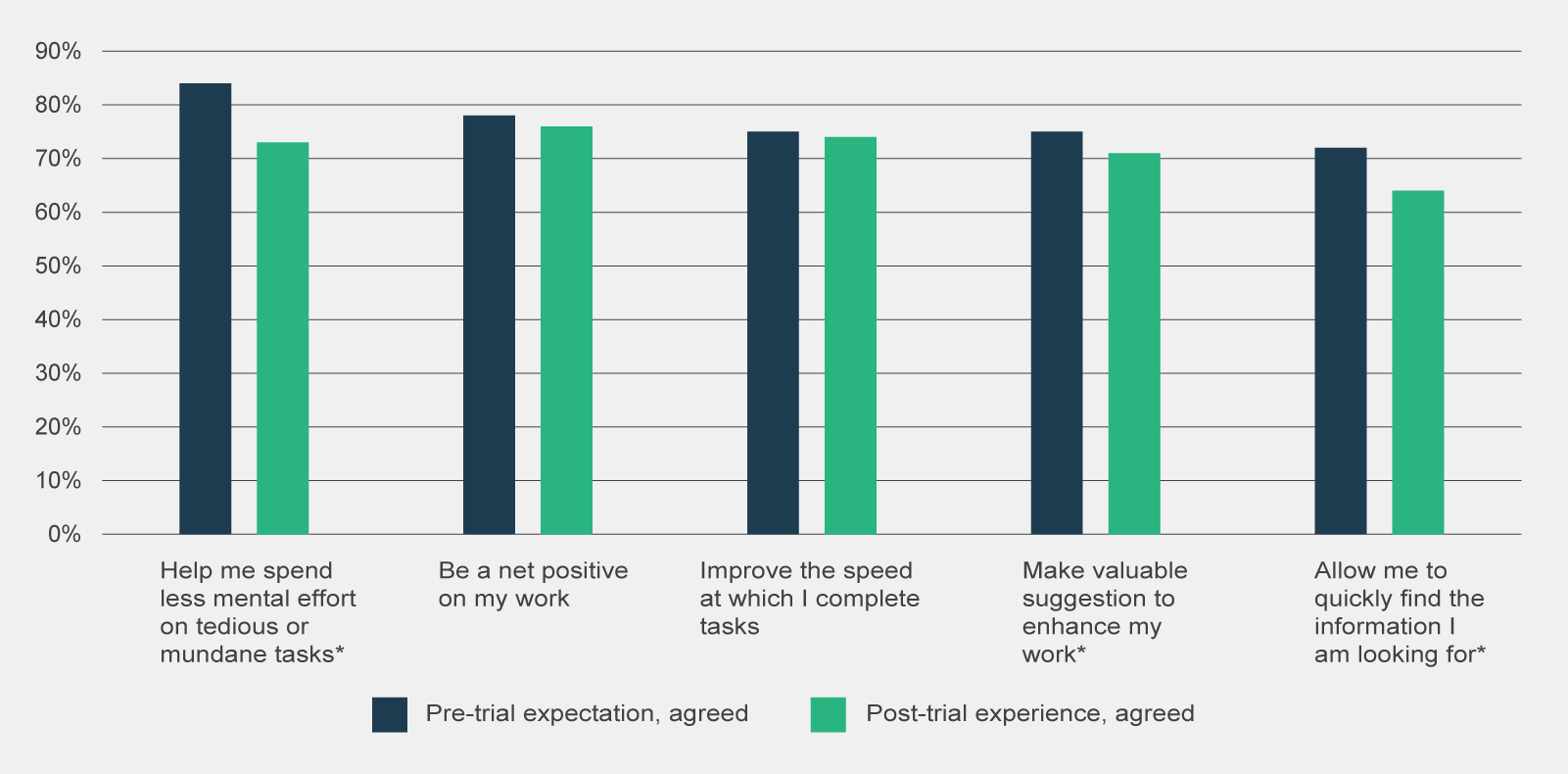
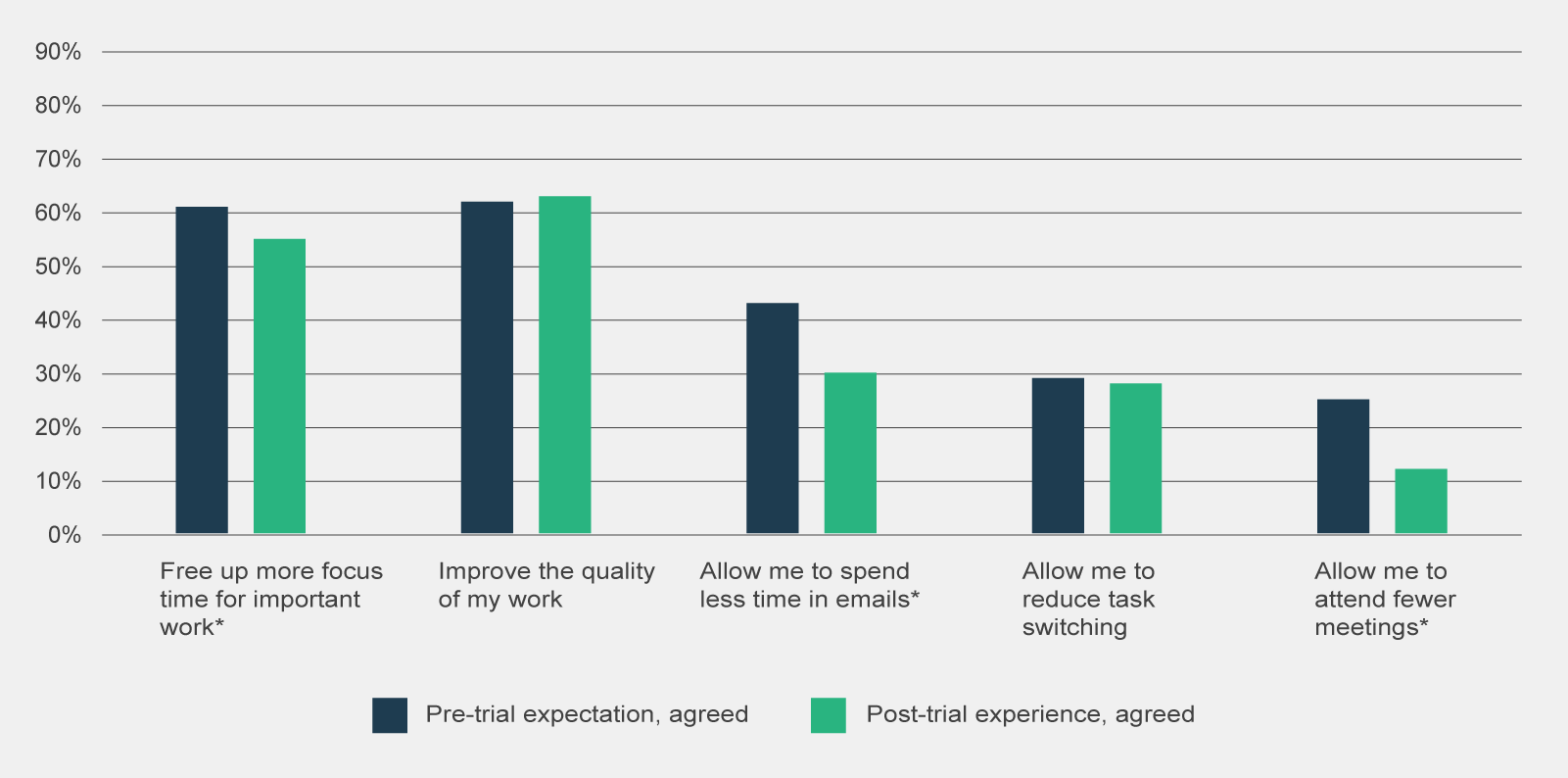
Figure 8 | Comparison of combined 'somewhat agree', 'agree' and 'strongly agree' responses to pre-use survey statement 'I believe Copilot will…' and post-use survey statement 'Using Copilot has…', by type of observation (n=330)
Data table for figure 8
Comparison of combined 'somewhat agree', 'agree' and 'strongly agree' responses to pre-use survey statement 'I believe Copilot will…' and post-use survey statement 'Using Copilot has…', by type of observation (n=330).
| Sentiment | Pre-trial expectation, agreed | Post-trial experience, agreed |
|---|---|---|
| Help me spend less mental effort on tedious or mundane tasks* | 84% | 73% |
| Be a net positive on my work | 78% | 76% |
| Improve the speed at which I complete tasks | 75% | 74% |
| Make valuable suggestion to enhance my work* | 75% | 71% |
| Allow me to quickly find the information I am looking for* | 72% | 64% |
| Free up more focus time for important work* | 61% | 55% |
| Improve the quality of my work | 62% | 63% |
| Allow me to spend less time in emails* | 43% | 30% |
| Allow me to reduce task switching | 29% | 28% |
| Allow me to attend fewer meetings* | 25% | 12% |
*Statistically significant change (p-value < 0.05)
OffIt is likely that trial participants expectations were heightened prior to the commencement of the trial. During consultations, it was noted that the features of Copilot (and generative AI more broadly) were marketed as being able to significantly save participants’ time, thereby heightening participants expectations. These expectations appear to have been tempered following Copilot’s use.
Of note, the most significant reductions in positive sentiment were observed in activities where survey respondents had the lowest expectations. There was a 32% decrease in the positive belief that Copilot allowed participants to ‘spend less time in emails’ and a 54% reduction in the belief that it would allow them to ‘attend fewer meetings.’ Even with low expectations, survey respondents did not perceive Copilot was able to assist in these activities.
Other generative AI tools may be more effective at meeting bespoke users’ needs than Copilot
The small proportion of trial participants who use other generative AI products in a work capacity found those tools met their needs slightly better than Copilot.
Of the post-use survey respondents, 16% reported that they use other generative AI products to support their role. Post-use survey respondents reported using the following tools:
- Versatile LLMs – ChatGPT, Gemini, Claude, Amazon Q, Meta AI
- Development tools – Github Copilot, Azure
- Image generators/editors – Midjourney, Dall-E 2, Adobe, Canva
As shown in Table 2, 44% of post-use respondents who used other generative AI tools viewed that other tools met their needs more than Copilot.
| Sentiment | Response (%) |
|---|---|
| Other generative AI products meet my needs significantly more than Copilot | 13% |
| Other generative AI products meet my needs slightly more than Copilot | 31% |
| Copilot and other generative AI products meet my needs to the same extent | 32% |
| Copilot meets my needs slightly more than other generative AI products | 13% |
| Copilot meets my needs significantly more than other generative AI products | 11% |
Copilot offers general functionality, matching most features of other publicly available generative AI products, but it may not offer an equivalent level of sophistication or depth across all these features. Post-use survey respondents noted that generative AI products were used for discrete use cases where Copilot was considered less advanced such as: writing and reviewing code, producing more complex written documents, generating images for internal presentations and searching research databases.
Despite the positive sentiment, the actual use of Copilot is moderate
A third of post-use survey respondents used Copilot daily.
While survey respondents were generally positive towards Copilot, the majority of survey respondents did not frequently use Copilot. As shown in Table 3, only a third of post-use survey respondents used Copilot on a daily basis.
| How frequently did you use Copilot for Microsoft 365 during the trial? | Responses (%) |
|---|---|
| Not at all | 1% |
| A few times a month | 21% |
| A few times a week | 46% |
| A few times a day | 26% |
| Most of the day | 6% |
The moderate frequency of usage was broadly consistent across APS classifications and job families. There was variance, however, across cohorts relating to the features used. For example, a higher proportion of SES and EL2s used the Teams meeting summarisation compared to other APS classifications. This could reflect the higher number of meetings these cohorts needed to attend, and therefore the higher usage and potential benefits in meeting summaries for the SES and EL2 classifications.
Post-use survey respondents who only used Copilot a few times a month highlighted that they stopped using Copilot because they had a poor first experience with the tool or that it took more time to verify and edit outputs than it would take to create them otherwise. Similarly, other post-use survey respondents remarked they did not feel confident using the tool and couldn’t find time for training among other work commitments and time pressures.
Focus groups with trial participants also remarked that they often forgot Copilot was embedded into Microsoft 365 applications as it was not obviously apparent in the user interface. Consequently they neglected to use features, including forgetting to record meetings for transcription and summarisation. Commonwealth Scientific and Industrial Research Organisation (CSIRO) identified through internal research with CSIRO trial participants that the user interface at times made it difficult to find features (CSIRO 2024:28). Given one of the arguable advantages of Copilot is its current integration with existing MS workflows, its reported lack of visibility amongst users largely diminishes its greatest value-add.
Overall, the usage of Copilot is in its infancy within the APS. Due to a combination of user capability, user interface, perceived benefit of the tool and convenience, Copilot is yet to be ingrained in the daily habits of APS staff.
Copilot was predominantly used to summarise and re-write content
Copilot use is concentrated in MS Teams and Word.
While Copilot provides support in a range of activities, the use of Copilot amongst trial participants was concentrated in a few activities. As shown in Figure 9, over 70% of post-use survey respondents used Copilot in Teams to summarise meetings, and in Word to summarise documents or to re-write content.
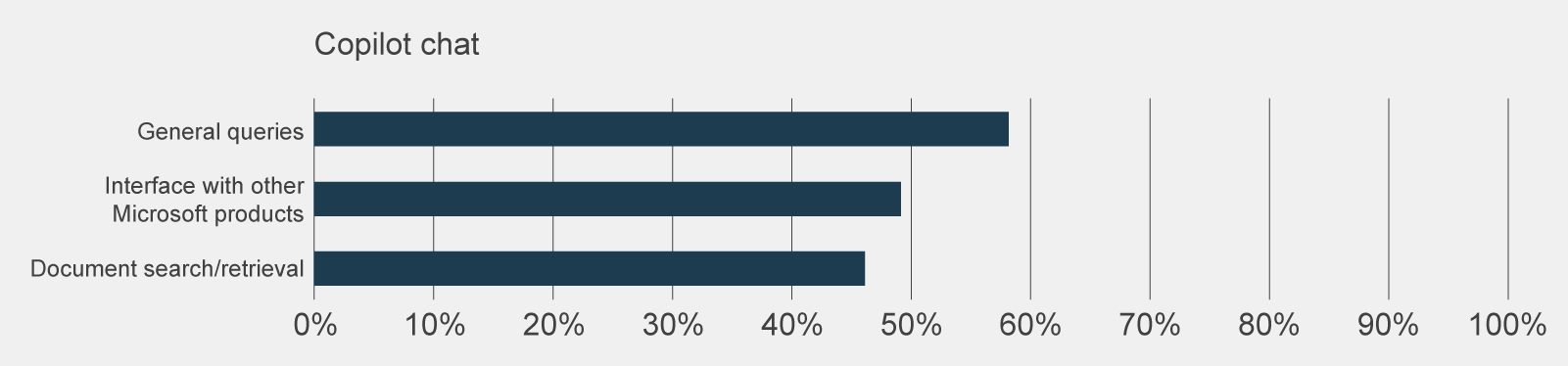
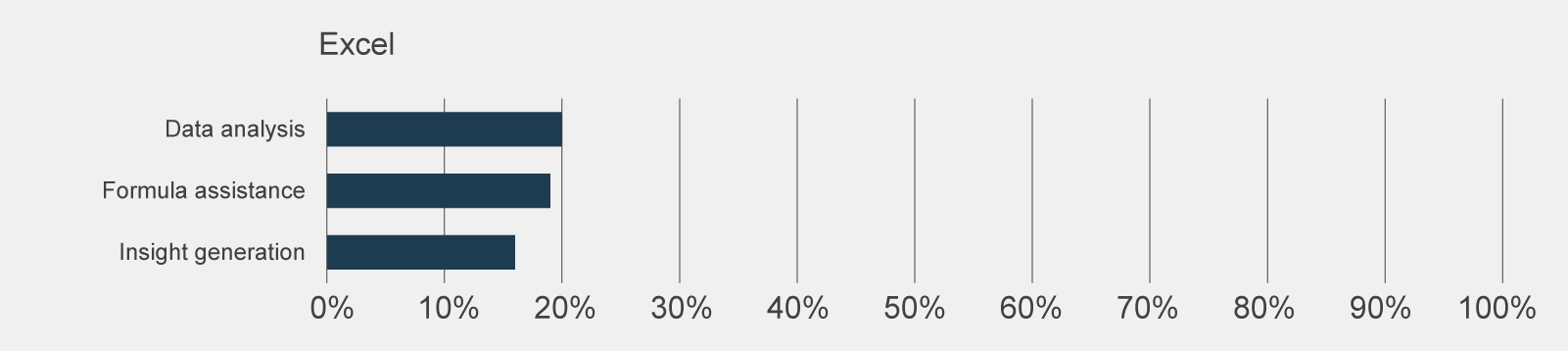
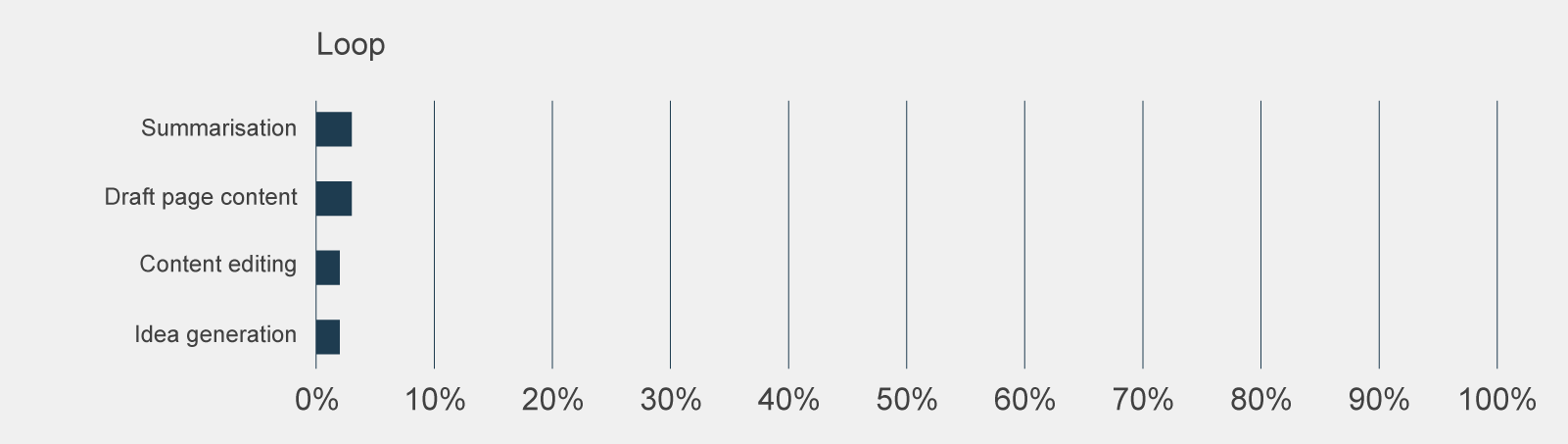
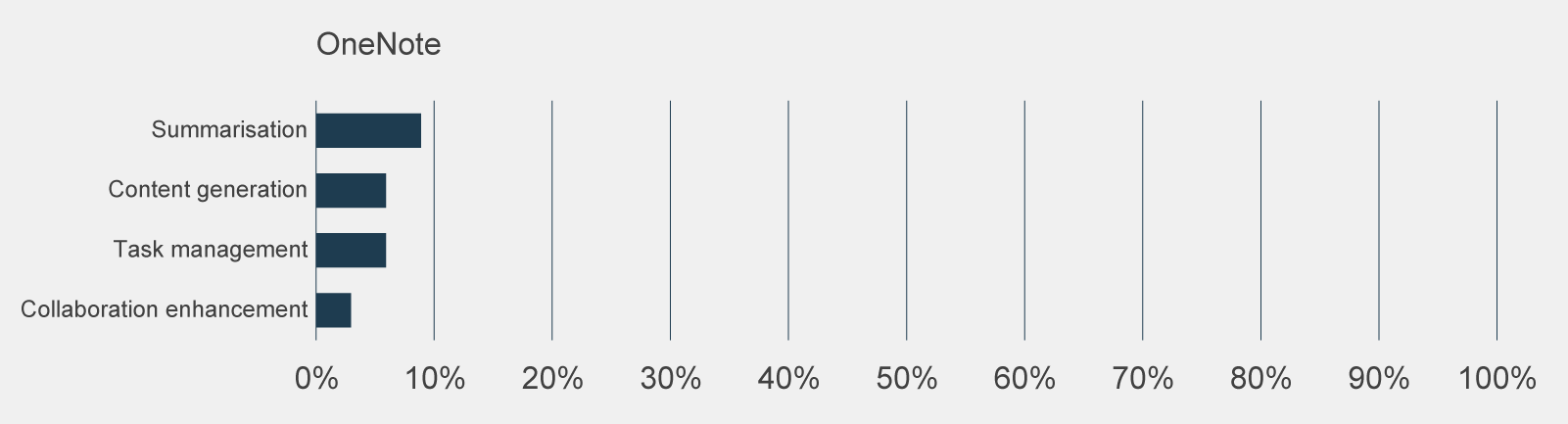
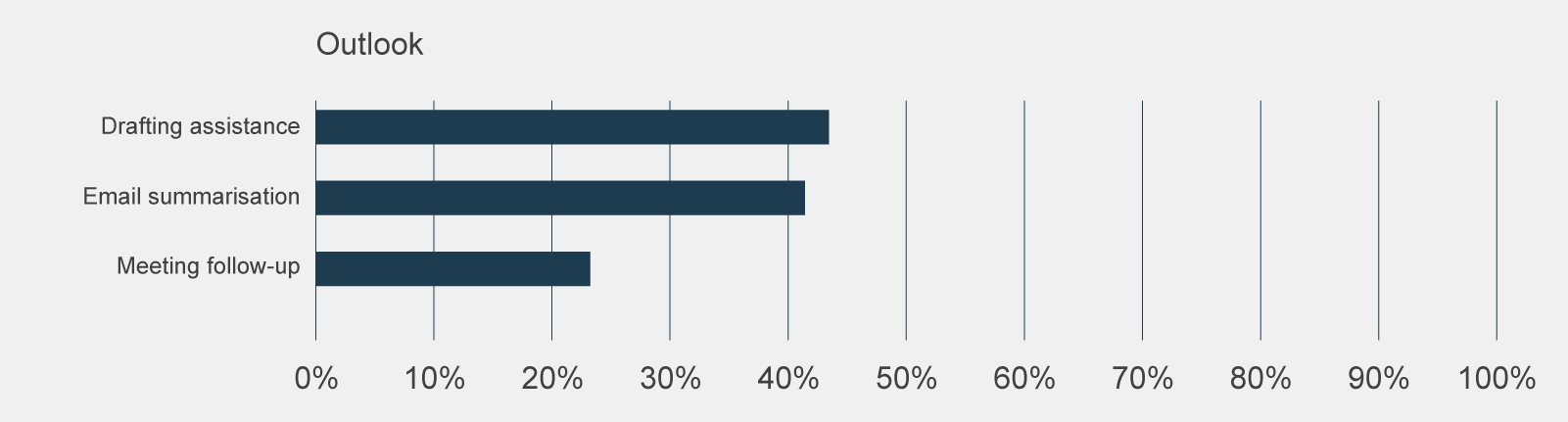
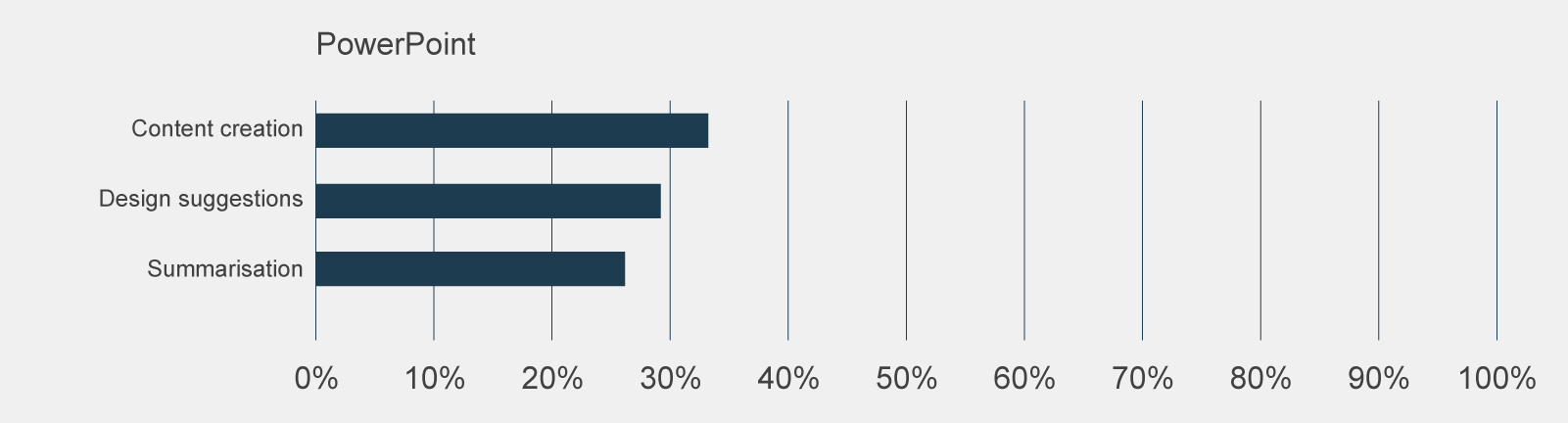
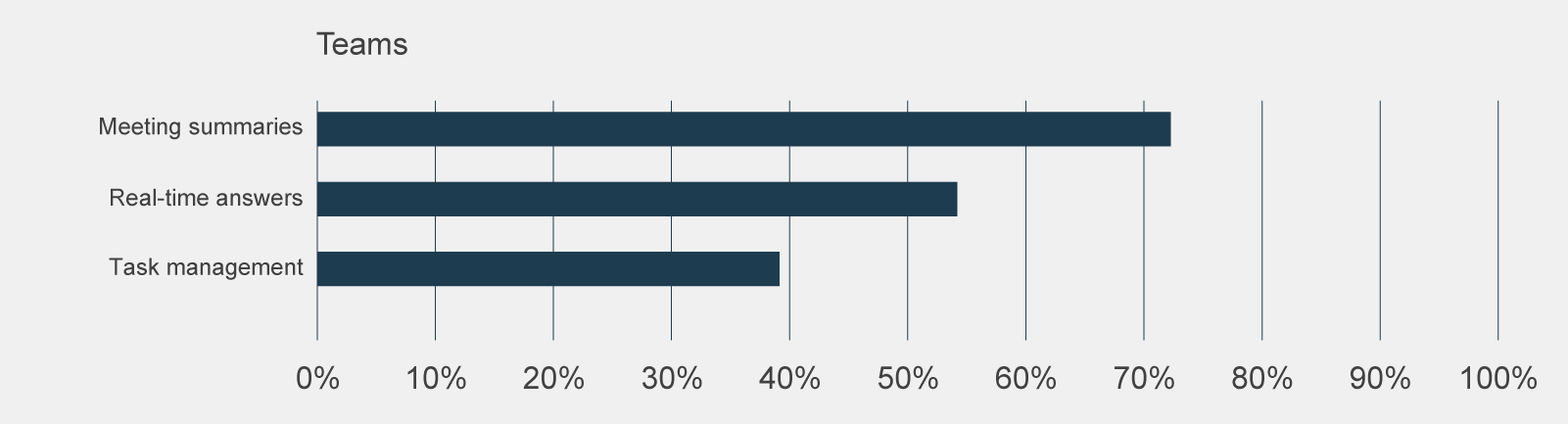
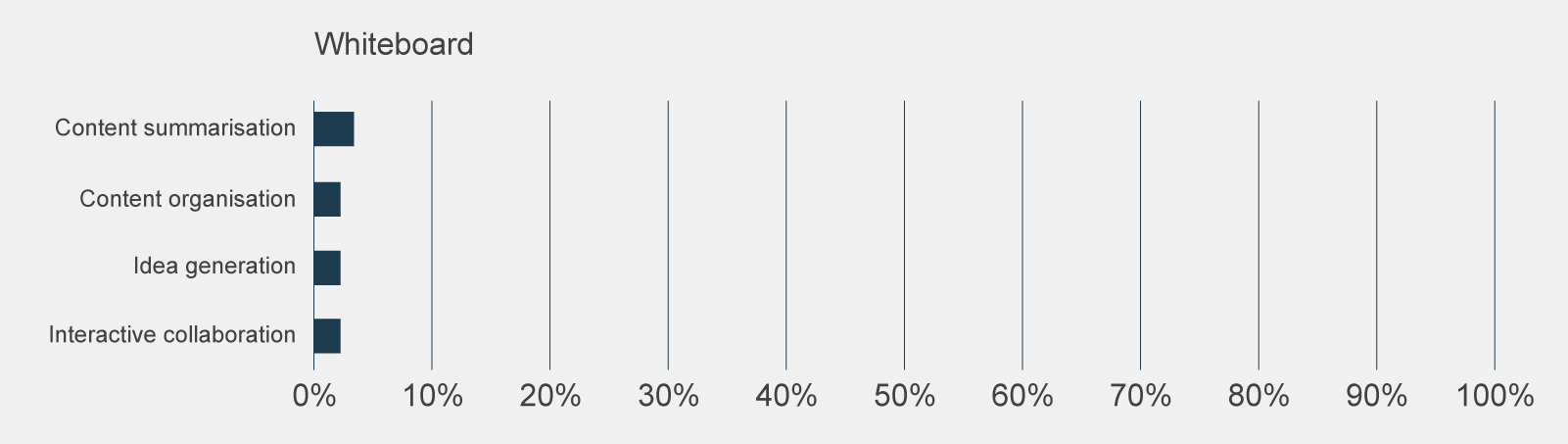
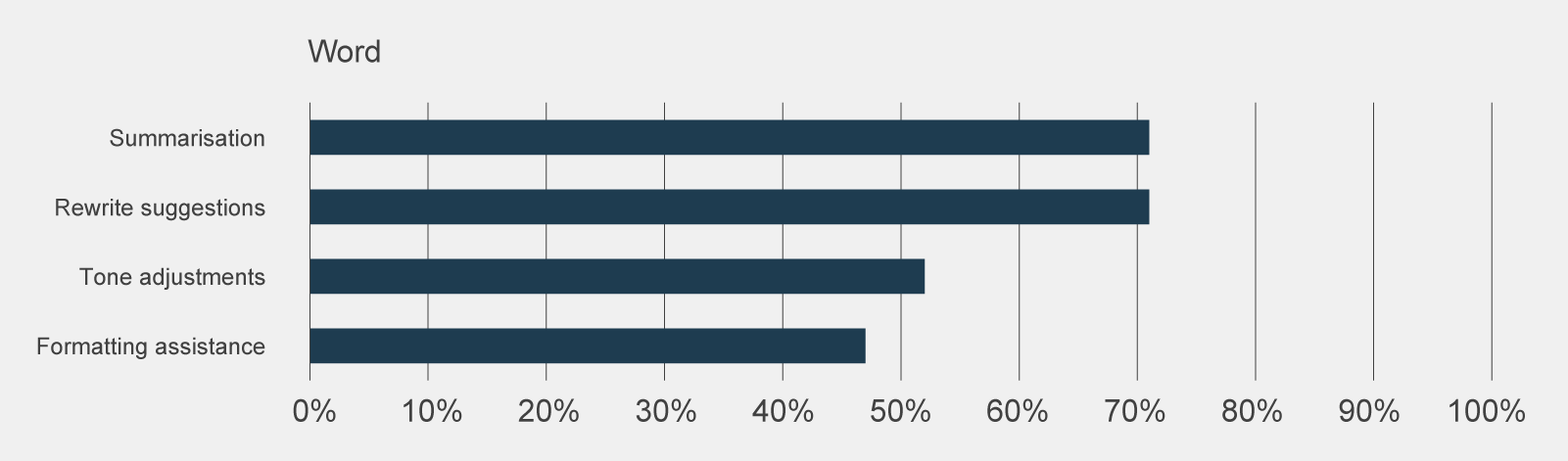
Figure 9 | Post-use survey responses, grouped by Microsoft application, to 'How frequently did you use the following features?' of ‘a few times a month’ or more frequent
Data table for figure 9
Off
Post-use survey responses, grouped by Microsoft application, to 'How frequently did you use the following features?' of ‘a few times a month’ or more frequent.
| Feature | Used at least once | Microsoft application |
|---|---|---|
| General queries | 58% | Copilot chat |
| Interface with other Microsoft products | 49% | Copilot chat |
| Document search/retrieval | 46% | Copilot chat |
| Data analysis | 20% | Excel |
| Formula assistance | 19% | Excel |
| Insight generation | 16% | Excel |
| Summarisation | 3% | Loop |
| Draft page content | 3% | Loop |
| Content editing | 2% | Loop |
| Idea generation | 2% | Loop |
| Summarisation | 9% | OneNote |
| Content generation | 6% | OneNote |
| Task management | 6% | OneNote |
| Collaboration enhancement | 3% | OneNote |
| Drafting assistance | 43% | Outlook |
| Email summarisation | 41% | Outlook |
| Meeting follow-up | 23% | Outlook |
| Content creation | 33% | PowerPoint |
| Design suggestions | 29% | PowerPoint |
| Summarisation | 26% | PowerPoint |
| Meeting summaries | 72% | Teams |
| Real-time answers | 54% | Teams |
| Task management | 39% | Teams |
| Content summarisation | 3% | Whiteboard |
| Content organisation | 2% | Whiteboard |
| Idea generation | 2% | Whiteboard |
| Interactive collaboration | 2% | Whiteboard |
| Summarisation | 71% | Word |
| Rewrite suggestions | 71% | Word |
| Tone adjustments | 52% | Word |
| Formatting assistance | 47% | Word |
Data table for figure 10
Off
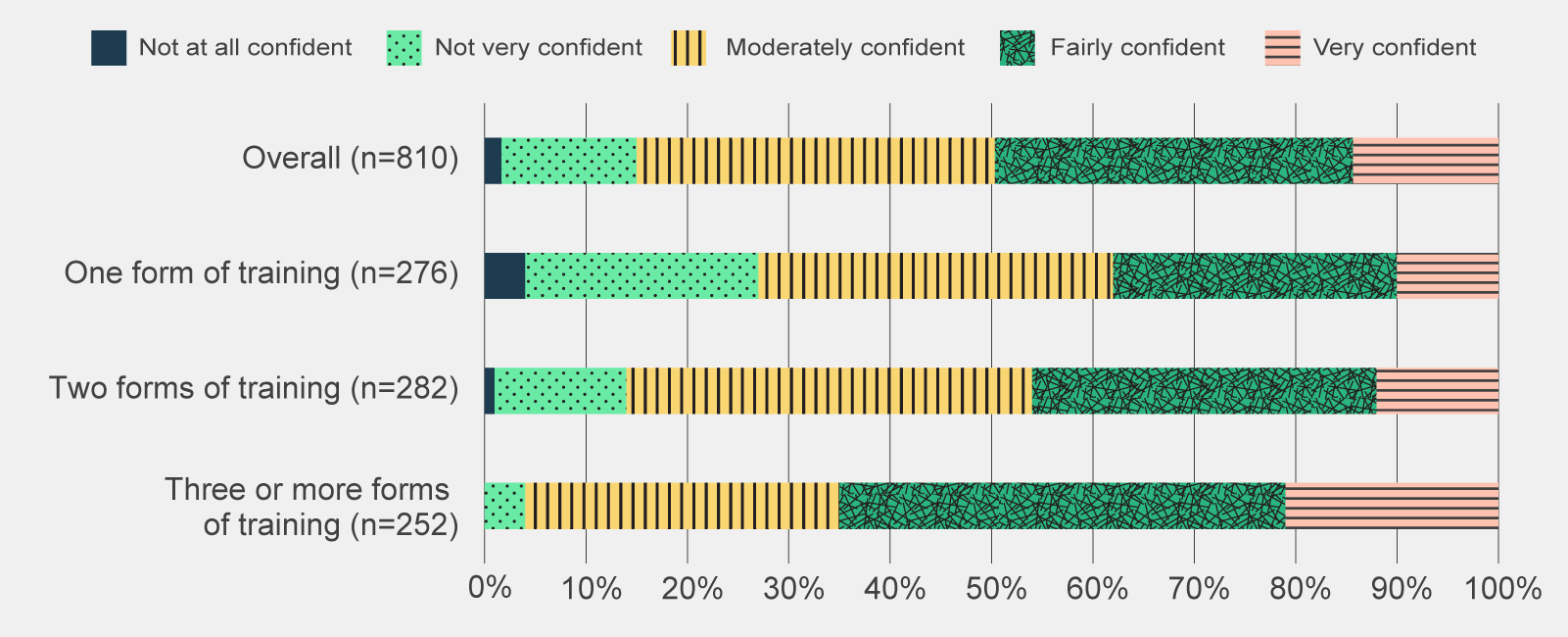
Post-use survey responses to 'Do you agree with the following statement: I feel confident in my skills and abilities to use Copilot', by amount of training received (n=810).
| Sentiment | Not at all confident | Not very confident | Moderately confident | Fairly confident | Very confident |
|---|---|---|---|---|---|
| Overall (n=810) | 2% | 13% | 35% | 35% | 14% |
| One form of training (n=276) | 4% | 23% | 35% | 28% | 10% |
| Two forms of training (n=282) | 1% | 13% | 40% | 34% | 12% |
| Three or more forms of training (n=252) | 0% | 4% | 31% | 44% | 21% |
The general sentiment among focus group participants who were involved in their agency’s implementation (namely chief technology officers (CTOs)/chief information officers (CIOs) and Copilot Champions) was that training requirements were greater than anticipated.
Complicating this is the diverse digital literacy and maturity of staff. Some agencies were better positioned to manage this than others but the positive relationship between perceived capability and amount of training suggests that a concerted, material and ongoing effort is needed to build confidence. A one-off session is unlikely to have a lasting impact on a user’s skills and abilities.
Trial participants broadly found Copilot training useful but noted areas for improvement.
The majority of post-use survey respondents (76%) who attended either agency or Microsoft-led training found the sessions useful. Anecdotal evidence from focus groups, however, suggested that more could be done to personalise training, particularly the training delivered by Microsoft.
Focus group participants believed that Microsoft training was too focused on the features of Copilot, rather than its applications and use cases. Participants also noted that some Microsoft trainers did not understand the APS context and could not answer targeted questions.
To supplement Microsoft-led sessions, almost all agencies that participated in the evaluation offered some form of training. The quality and exhaustiveness of this training, however, varied according to the time and resource constraints of agencies. Some focus group participants had dedicated resources to lead the training effort, while others were encouraged to learn Copilot through hands-on use.
Training was most effective when tailored to APS and agency context.
One focus group participant found Microsoft’s industry specific advice and prompt library a useful aid to upskilling, others expressed a similar desire for cheat sheets with tailored prompts aligned to their roles. Several focus group participants remarked that they gained the most knowledge on impactful use cases through forums their agency created, such as ‘lunch and learns’, webinars, ‘promptathons’ or similar.
A more flexible, community of practice approach was also seen as an effective training method as it provided a means to identify and propagate highly relevant use cases for Copilot. In general, there appears to be a strong demand for training even amongst trial participants who had a high proportion of individuals who were already experienced in generative AI. This included a desire for a wide range of training and information sources supplemented by opportunities to share use cases and broad skills in generative AI.
There are opportunities to further explore use cases in the APS
There were a few novel use cases for Copilot in the APS.
Some trial participants identified a few novel use cases which were highly specific to the roles of participants but highlight the potential of Copilot to support higher order and more bespoke activities. These included:
- Writing and reviewing PowerShell script (for task automation)
- Assessing documents against a rubric or criteria
- Converting technical documentation into plain language (to distribute to a broader audience)
- Drafting content for internal exercises e.g. phishing simulations
- Drafting content for business cases and Cabinet Submissions
- Converting information into standard forms and templates (for processing and assessment).
The presence of novel use cases highlights that there are opportunities to innovatively use Copilot beyond its summarisation, information search and content drafting features.
References
- Commonwealth Scientific and Industrial Research Organisation (2024) ‘Copilot for Microsoft 365; Data and Insights’, Commonwealth Scientific and Industrial Research Organisation, Canberra, ACT, 28.
- Department of Industry, Science and Resources (2024) ‘DISR Internal Mid-Trial Survey Insights’, Department of Industry, Science and Resources, Canberra, ACT, 2.
The main use cases are an illustration of the current perceived strengths of Copilot’s predictive engine - it is adept at natural language processing and synthesis, where it can output human-like text in response to provided information and prompts.
Of note, the use of Copilot within Whiteboard and Loop were particularly low. This is not unsurprising when compared with the usage trends before the trial. It is also interesting to note the relatively lower use of Copilot to create content and ideas relative to summarisation of information.
There was a positive relationship between the provision of training and capability to use Copilot.
There was no standard approach undertaken to train trial participants on how to use Copilot. Participants adopted a combination of methods based on their perceived capability and resources provided to them. The 4 main training options available to trial participants were:
- accessing Copilot resources on the Internet
- hands-on experimentation with Copilot
- attending agency-facilitated Copilot training
- attending Microsoft-led Copilot training.
Almost half of all post-use survey respondents felt fairly or very confident in their skills and abilities to use Copilot. As depicted in Figure 10, the proportion of ‘fairly’ and ‘very confident’ responses combined is 16 percentage points higher when post-use survey respondents accessed 3 or more forms of training compared to overall. This indicates a positive correlation between the amount of training participants received and their ability to use Copilot. The importance of training was also highlighted in the CSIRO’s evaluation which reported that trial participants needed additional training and/or resources that would support advanced features and usage (CSIRO 2024:11).